When you trade high-risk markets such as crypto, risk management is essential to staying profitable over the long run. One of the most effective ways to manage that risk is to systematically use Take Profit (TP) and Stop Loss (SL) levels. These two tools are absolutely essential: they let you decide in advance the price levels at which you want to close a position. That way you can lock in the outcome you’re aiming for, whether it’s positive (TP) or negative for your P&L.
Once your TP and SL levels are set, the next job is placing them cleanly: on MT4/MT5, Trade Assistant draws them straight on the chart and works out the matching position size for your risk.
Take Profit: Definition (Prise de Bénéfices in French)
The Take Profit is an automatic order that closes a position once price reaches a predefined level matching a favorable scenario and locking in profits. The goal is to secure your gains when the market hits a favorable price.
Take Profit & Stop Loss: Why Do They Matter So Much?
Why use a Take Profit?
- Automating your gains: It secures your profits without having to watch the market constantly. Even if your discipline and focus were flawless, the price you’re targeting can sometimes be tagged for just a few moments!
- Less stress: By setting a profit level in advance, traders can avoid impulsive decisions.
- Managing your strategy: It helps you build a clear, disciplined trading strategy.
Stop Loss or SL (Cesser les Pertes in French)
The Stop Loss is an automatic order that closes a position once price reaches a predefined unfavorable level. It’s designed to cap your losses and protect your trading capital.
Why use a Stop Loss?
- Protecting your capital: It keeps losses from spiraling out of control and protects the capital you’ve invested.
- Trading discipline: By setting a loss limit in advance, traders stay disciplined and avoid emotional behavior.
- Risk management: It’s a core part of any effective risk management strategy.
Stop Loss and Take Profit: How to Use Them
Everyone has their own way of setting Stop Loss and Take Profit levels. Here are a few classic methods to start with:
Fixed Percentages
Set your TP and SL levels based on a fixed percentage of the entry price. For example, a trader might decide to take profit at +5% and cut losses at -3%.
Support and Resistance
Use support and resistance levels to decide where to place your TP and SL. Traders often aim to take profit just ahead of major resistance levels and to place their SL below support levels.
Moving Averages
Use moving averages as reference points for your TP and SL levels. For example, a trader might set a TP at a long-term moving average and an SL below a short-term moving average.
Fibonacci Levels
Use Fibonacci retracements to set your TP and SL levels. Key levels such as 38.2%, 50% and 61.8% are often used as reference points.
Why Using the ATR Can Be the Smarter Choice
While these traditional methods are widely used, they come with certain limitations. Fixed percentages, for instance, don’t account for current market volatility, which can lead to premature SL triggers in volatile markets or overly ambitious TPs in quiet ones.
The Average True Range (ATR) overcomes these limitations by adjusting your TP and SL levels to match market volatility. Here’s why the ATR is often seen as a better approach:
- Adapts to volatility: The ATR automatically adjusts your TP and SL levels to match market volatility. The more volatile the market, the higher the ATR, which lets you place wider levels and avoid premature triggers.
- Simple to calculate: The ATR is relatively simple to calculate and to build into trading strategies, which makes it accessible even for beginner traders.
- Versatile: It can be used on any timeframe and for any asset, which makes it extremely versatile.
Average True Range (ATR): Introduction
To set these levels optimally, it’s essential to rely on trustworthy technical indicators. The Average True Range (ATR) is one of them. Developed by J. Welles Wilder, the ATR measures market volatility by averaging the gaps between the highest and lowest prices over a given period. This indicator is particularly useful for adjusting your TP and SL levels to current market conditions.
Using the ATR to Place Your TP and SL Levels
The ATR can be used to set dynamic TP and dynamic Stop Loss levels that adjust to market volatility. For example, a trader might decide to place their TP at three times the ATR and their SL at one times the ATR. This method ensures your TP and SL levels stay proportional to current volatility, which can improve the performance of your trading strategy.
Introducing Our TradingView Script
To help traders integrate the ATR effectively into their TP and SL placement strategy, we’ve developed a TradingView script. This script not only calculates the ATR but also adjusts the TP and SL levels to account for transaction fees, ensuring that your net profits and losses are optimized.
How to Calculate Take Profit & Stop Loss with a TradingView Script
//@version=4
study(title="ATR TPSL avec frais", shorttitle="captain-trading.com - ATR TP/SL avec frais", overlay=true)

length = input(title="Length", defval=14, minval=1)
smoothing = input(title="Smoothing", defval="RMA", options=["RMA", "SMA", "EMA", "WMA"])
tp_multiplier = input(3.0, title="Ratio TP")
sl_multiplier = input(1.0, title="Ratio SL")
fee_percent = input(title="Frais (%)", defval=0.1, minval=0.0, step=0.01) / 100

src1 = input(high)
src2 = input(low)
pline = input(true, "Show Price Lines")
col1 = input(color.blue, "ATR Text Color")
col2 = input(color.teal, "Low Text Color", inline="1")
col3 = input(color.red, "High Text Color", inline="2")
collong = input(color.teal, "Low Line Color", inline="1")
colshort = input(color.red, "High Line Color", inline="2")

ma_function(source, length) =>
    if smoothing == "RMA"
        rma(source, length)
    else
        if smoothing == "SMA"
            sma(source, length)
        else
            if smoothing == "EMA"
                ema(source, length)
            else
                wma(source, length)

atr = ma_function(tr(true), length)
fee = close * fee_percent

long_tp = close + tp_multiplier * atr + 2 * fee
long_sl = close - sl_multiplier * atr - 2 * fee

short_tp = close - tp_multiplier * atr - 2 * fee
short_sl = close + sl_multiplier * atr + 2 * fee

var table Table = table.new(position.bottom_center, 5, 1, border_width=3)

f_fillCell(_table, _column, _row, _value, _timeframe) =>
    _cellText = _timeframe + tostring(_value, "#.#####")
    table.cell(_table, _column, _row, _cellText, text_color=col1)

if barstate.islast
    f_fillCell(Table, 0, 0, atr, "ATR: ")
    f_fillCell(Table, 1, 0, long_tp, "Long TP: ")
    f_fillCell(Table, 2, 0, long_sl, "Long SL: ")
    f_fillCell(Table, 3, 0, short_tp, "Short TP: ")
    f_fillCell(Table, 4, 0, short_sl, "Short SL: ")
How the Script Works
- User inputs:
- Length: The period used to calculate the ATR.
- Smoothing: The type of moving average used to smooth the ATR.
- TP Multiplier: The multiplier used to calculate the Take Profit level.
- SL Multiplier: The multiplier used to calculate the Stop Loss level.
- Fees: The transaction fee percentage.
- ATR calculation:
- The script calculates the ATR using the chosen moving-average method.
- Including fees:
- The TP and SL levels are adjusted to include transaction fees. This ensures that your net profits and losses factor in trading costs.
- Display:
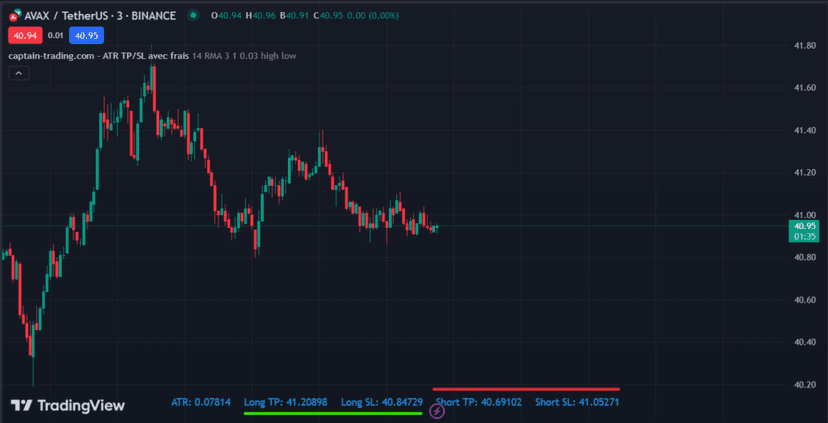
- The ATR value along with the TP and SL levels for long and short positions are shown in a table at the bottom of the chart.
How to Use the Script
Set up the script in TradingView with the TP and SL levels you want, and add the fees of the platform you’re using.
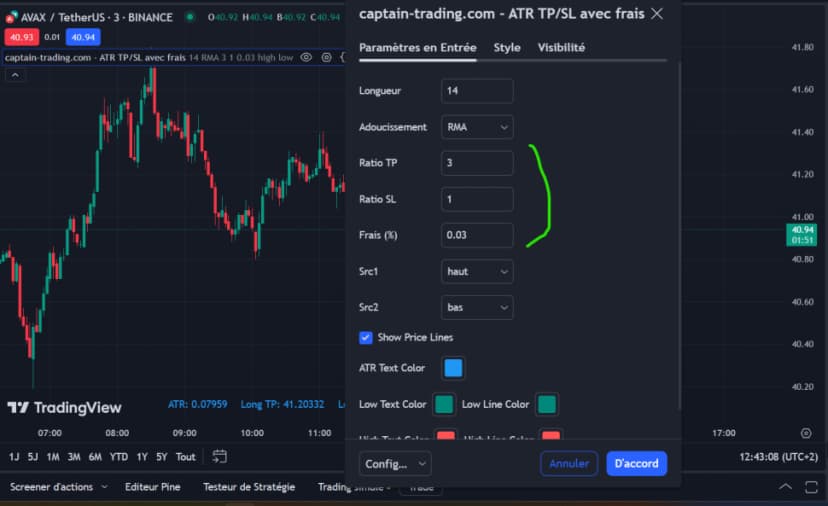
The script automatically shows you the TP and SL levels to plug into your trade.
- In green for a Long position
- In red for a Short position
Conclusion
Using the Average True Range (ATR) to set your Take Profit and Stop Loss levels is an effective way to manage risk in crypto trading. By building transaction fees into these calculations, you can make sure your net profits and losses are optimized, which is crucial for a profitable trading strategy. The TradingView script above is a powerful tool that helps you automate this process, making your trading more precise and efficient.
Benefits of Using the Script
- Automation: The script automates the calculation and adjustment of your TP and SL levels, which reduces human error.
- Time savings: By automating these calculations, traders can focus on other aspects of their strategy.
- Precision: Factoring in transaction fees ensures that your TP and SL levels are accurate and optimized to maximize profits and minimize losses.
In short, the ATR-based TradingView script is a tool that will appeal to any trader looking to optimize their Take Profit and Stop Loss levels while accounting for transaction fees, which can vary widely depending on your volume or the trading platform you use. Use it to sharpen your trading strategy and improve your odds of success in the cryptocurrency market.
The Live Where FX Explains ATR vs. TP

Take Profit: Our YouTube Tutorial

Every guide here is free. Browse the full course and join a community of traders who share ideas every day.